


In today’s data-driven world, managing information efficiently is the backbone of every software system — from small startups to enterprise-scale applications like banking, social media, and e-commerce. This is where DBMS (Database Management System) comes into play.
This article condenses essential DBMS concepts you’ll encounter in engineering interviews and real-world system design: SQL vs NoSQL, partitioning & sharding, the CAP theorem, Master–Slave architecture, and scaling patterns used by production systems (e.g., a cab-booking app). Each section is written to be clear for students while remaining useful for practitioners — with short code examples and a concise most asked interview topics at the end.
NOTE: In this article I have not included the
SQLbecause its in itself a skill to master. If you want to learn about SQL, especially MySQL, Check this article out for better understanding of the topic: Mastering MySQL.
Module 1: Database System Architecture
Database System Architecture
Data Abstraction
- Data abstraction is the process of hiding the complex internal details of the database from the user and providing simplified views.
- It makes database usage more efficient by showing only what is necessary to the user.
- There are three levels of abstraction in DBMS.
- Physical or Internal Level describes how the data is physically stored using files, indices, hashing, or B+ trees.
- Logical or Conceptual Level describes the logical structure of the entire database including tables, attributes, and relationships.
- View or External Level describes the user-specific view of data, hiding irrelevant details and ensuring security.
Data Independence
- Data independence ensures that schema changes at one level do not affect the higher levels of abstraction.
- Physical Data Independence means changes in physical storage such as changing indexing methods, partitioning, or compression should not affect the logical schema.
- Logical Data Independence means changes in the logical schema such as adding a new column or modifying relationships should not affect the user’s view or application programs.
- This property makes databases flexible and easier to maintain over time.
Database Languages
- Data Definition Language (DDL) is used to define and modify database schema. Examples are CREATE, ALTER, DROP, TRUNCATE, RENAME, COMMENT.
CREATE TABLE Student (StudentID INT PRIMARY KEY, Name VARCHAR(50), Age INT);
ALTER TABLE Student ADD Email VARCHAR(100);
DROP TABLE Student;- Data Manipulation Language (DML) is used for storing, modifying, deleting, and retrieving data. Examples are SELECT, INSERT, UPDATE, DELETE, MERGE.
INSERT INTO Student VALUES (1, 'Ravi', 20);
UPDATE Student SET Age = 21 WHERE StudentID = 1;
DELETE FROM Student WHERE Age < 18;
SELECT Name, Age FROM Student WHERE Age > 19;- Data Control Language (DCL) is used for permissions. Examples are GRANT and REVOKE.
GRANT SELECT ON Student TO user1;
REVOKE UPDATE ON Student FROM user1;- Transaction Control Language (TCL) manages transactions. Examples are COMMIT, ROLLBACK, SAVEPOINT.
START TRANSACTION;
UPDATE Student SET Age=22 WHERE StudentID=1;
ROLLBACK; -- Undo change
COMMIT; -- Save changeData Models
Entity-Relationship (E-R) Model
- The ER model is a high-level data model that represents real-world entities and their relationships.
- An entity is an object in the real world such as Student or Course.
- An attribute is a property of an entity such as Name, Age, or CourseID.
- A relationship represents associations among entities such as Student enrolls in Course.
- ER diagrams provide a blueprint of the database design.
Example Table Representation
| Entity | Attributes |
|---|---|
| Student | StudentID (PK), Name, Age |
| Course | CourseID (PK), Title, Credits |
Relationship: Student – Enrolls – Course (Many-to-Many).

Network Model
- The network model organizes data using records and links (pointers).
- It represents data as nodes and relationships as edges.
- Each record can have multiple parent and child relationships.
- Example: A Department has multiple Employees, and Employees may belong to multiple Projects.
Relational Model
- The relational model organizes data into tables also called relations.
- Each table has rows called tuples and columns called attributes.
- Properties include unique table names, atomic attribute values, no duplicate rows, and no importance of row or column order.
- SQL is based on the relational model.
Example Relation: Student
| StudentID | Name | Age | Course |
|---|---|---|---|
| 1 | Ravi | 20 | CSE |
| 2 | Meena | 21 | AIML |
Object-Oriented Data Model
- The object-oriented data model combines database concepts with object-oriented programming.
- Data is represented as objects with attributes and methods.
- It supports inheritance, encapsulation, and polymorphism.
- Useful for complex applications such as multimedia systems, CAD/CAM, and scientific research.
Example in Java Style
class Student {
int id;
String name;
void enroll(Course c) { ... }
}Integrity Constraints
- Domain Constraint ensures attribute values must come from a defined domain such as Age between 18 and 60.
- Entity Integrity ensures that the primary key of a table cannot be NULL.
- Referential Integrity ensures that foreign key values must match an existing primary key in another table or be NULL.
- Key Constraints ensure that each row in a table is uniquely identified.
Example SQL
CREATE TABLE Course (
CourseID INT PRIMARY KEY,
Title VARCHAR(50)
);
CREATE TABLE Student (
StudentID INT PRIMARY KEY,
Name VARCHAR(50),
CourseID INT,
FOREIGN KEY (CourseID) REFERENCES Course(CourseID)
);Data Manipulation Operations
- Insertion is used to add new records into a table.
- Deletion is used to remove records from a table.
- Updation is used to modify existing records.
- Retrieval is used to query data using SELECT statements.
Example SQL
INSERT INTO Course VALUES (101, 'DBMS');
SELECT Name FROM Student WHERE CourseID = 101;Comparisons of Data Models
| Feature | ER Model | Network Model | Relational Model | Object-Oriented Model |
|---|---|---|---|---|
| Representation | Entities & Relationships | Records and Links (Graph) | Tables with rows and columns | Objects with attributes & methods |
| Schema Flexibility | Moderate | Low (complex pointers) | High (SQL based) | High (OOP concepts) |
| User Friendliness | High (visual) | Low | High | Moderate |
| Common Usage | Database design stage | Legacy applications | Most modern DBMS (MySQL, Oracle) | Complex apps (CAD, Multimedia) |
Module 2: Relational Query Languages & Relational Database Design
Relational Query Languages
Relational Algebra
- Relational algebra is a procedural query language used to retrieve data from relations (tables).
- It defines a sequence of operations to obtain a required result.
- Each operation takes one or two relations as input and produces a new relation as output.
Core Operators
- Selection (sigma σ): Selects tuples that satisfy a condition. Example: σ Age > 20 (Student).
- Projection (pi ∏): Selects specific attributes (columns). Example: ∏ Name, Age (Student).
- Union (U): Combines tuples from two relations, removes duplicates. Example: Student U Teacher.
- Intersection (∩): Returns common tuples between two relations. Example: Student ∩ Alumni.
- Difference (−): Returns tuples in one relation but not in another. Example: Student − Alumni.
- Cartesian Product (×): Combines each tuple of one relation with each tuple of another. Example: Student × Course.
- Join (⨝): Combines related tuples from two relations based on a condition. Example: Student ⨝ Student.CourseID = Course.CourseID Course.
- Rename (rho ρ): Renames the relation or its attributes. Example: ρ(S1, Student).
Example Input Table: STUDENT
| StudentID | Name | Age | CourseID |
|---|---|---|---|
| 1 | Ravi | 20 | 101 |
| 2 | Meena | 21 | 102 |
| 3 | Arjun | 19 | 101 |
Query: ∏ Name (σ Age > 20 (STUDENT)) Result: {Meena}
Tuple Relational Calculus (TRC)
- TRC is a non-procedural query language where queries specify what to retrieve instead of how.
- It uses tuple variables to represent rows of a relation.
General Form {t | P(t)} where t = tuple variable and P(t) = condition applied on t.
Example {t.Name | Student(t) AND t.Age > 20} This retrieves names of students older than 20.
Domain Relational Calculus (DRC)
- DRC is another non-procedural query language.
- It uses domain variables that represent attribute values instead of whole tuples.
General Form {<a1, a2, …, an> | P(a1, a2, …, an)} where ai = attribute values and P = condition.
Example {<Name, Age> | ∃ CourseID (Student(Name, Age, CourseID) AND Age > 20)} This retrieves name and age of students older than 20.
SQL3 (Extended SQL)
- SQL3 is an extension of SQL with object-oriented and advanced features.
- It supports recursive queries, triggers, user-defined types, and inheritance.
Example Recursive Query
WITH RECURSIVE EmployeeHierarchy AS (
SELECT EmpID, ManagerID FROM Employee WHERE ManagerID IS NULL
UNION
SELECT e.EmpID, e.ManagerID
FROM Employee e, EmployeeHierarchy h
WHERE e.ManagerID = h.EmpID
)
SELECT * FROM EmployeeHierarchy;This query retrieves employees in a recursive management hierarchy.
Open Source and Commercial DBMS
| DBMS | Type | Strengths | Limitations |
|---|---|---|---|
| MySQL | Open-source | Fast, reliable, widely used in web apps, community-driven | Fewer enterprise-level features |
| Oracle | Commercial | High availability, clustering, scalability, advanced transaction support | Expensive licensing, complex administration |
| IBM DB2 | Commercial | Optimized for large-scale analytics and transactions, strong AI integration | Requires specialized skills, costly |
| SQL Server | Commercial | Excellent integration with Windows, Azure, Power BI, user-friendly | Licensing cost, Windows-centric |
Relational Database Design
Domain and Data Dependency
- Domain dependency means attribute values must come from a specific domain. Example: Age must be an integer between 18 and 60.
- Data dependency means one attribute depends on another. Example: EmpID determines EmpName.
Armstrong’s Axioms
- Armstrong’s axioms are inference rules used to derive functional dependencies.
- Reflexive Rule: If Y is a subset of X, then X determines Y.
- Augmentation Rule: If X determines Y, then XZ determines YZ.
- Transitive Rule: If X determines Y and Y determines Z, then X determines Z.
- Union Rule: If X determines Y and X determines Z, then X determines YZ.
- Decomposition Rule: If X determines YZ, then X determines Y and X determines Z.
- Pseudotransitivity Rule: If X determines Y and WY determines Z, then WX determines Z.
Normal Forms
| Normal Form | Condition | Example |
|---|---|---|
| 1NF | Values must be atomic (no repeating groups) | Name = "Ravi, Meena" violates 1NF |
| 2NF | In 1NF and no partial dependency (non-key depends on full key) | StudentID, CourseID → Marks but CourseName depends only on CourseID |
| 3NF | In 2NF and no transitive dependency | StudentID → AdvisorID, AdvisorID → AdvisorName |
| BCNF | Every determinant must be a candidate key | DeptID → HOD, but HOD not a candidate key |
| 4NF | In BCNF and no multi-valued dependencies | A teacher teaches multiple subjects and multiple classes |
| 5NF | In 4NF and no join dependency | Decomposition without loss of information |
| 6NF | Further decomposition into irreducible tables (temporal databases) | Used in advanced systems |
Dependency Preservation
- Ensures that functional dependencies are preserved after decomposition.
- If a dependency is lost, additional joins may be required to enforce it.
Lossless Design
- Decomposition is lossless if no information is lost after splitting a relation.
- Condition: If R is decomposed into R1 and R2, then R1 ∩ R2 must be a key of either R1 or R2.
Query Processing and Optimization
Evaluation of Relational Algebra Expressions
- Expressions are evaluated using relational algebra trees.
- Example: σ Age > 20 (∏ Name, Age (Student)) → first project Name and Age, then select tuples where Age > 20.
Query Equivalence
-
Two queries are equivalent if they produce the same result for all databases.
-
Example:
- σ Age > 20 (∏ Name, Age (Student))
- ∏ Name, Age (σ Age > 20 (Student)) Both are equivalent since selection and projection commute.
Join Strategies
- Nested Loop Join: Compare each tuple in R with each tuple in S. Simple but costly.
- Sort-Merge Join: Sort relations on join key, then merge. Efficient for sorted inputs.
- Hash Join: Partition both relations using a hash function, then match partitions. Fast for equality joins.
Query Optimization
- Query optimization selects the most efficient execution plan.
- Goals include reducing disk I/O, CPU usage, and memory consumption.
- Techniques include pushing selections before joins, using indexes, reordering joins, and using cost-based optimization.
Module 3: Storage strategies
1. Indexing & Hashing
In a database, information is stored as records. Each record contains a key field that uniquely identifies it (like a roll number identifying a student).
-
To find records efficiently — especially when dealing with large amounts of data — databases use a technique called indexing.
-
Indexing acts like the index section of a book, allowing us to quickly locate the required information without scanning every page.
Indices
An index is a data structure (like an index in a book) that allows faster retrieval of records from a database table.
It's main purpose is to speed up read operations such as SELECT queries by minimizing disk access.
Each index entry contains:
- Search Key: Copy of the attribute being indexed (e.g., Employee_ID).
- Data Reference: Pointer to the location of the actual record in the disk block.
Types of Indexing:
-
Primary Index:Primary index is defined on an ordered data file. The data file is ordered on a key field. The key field is generally the primary key of the relation. -
Secondary (Non Clustered) Index:Secondary index may be generated from a field which is a candidate key and has a unique value in every record, or a non-key with duplicate values. -
Clustering Index:Clustering index is defined on an ordered data file. The data file is ordered on a non-key field.

Ordered Indexing:
-
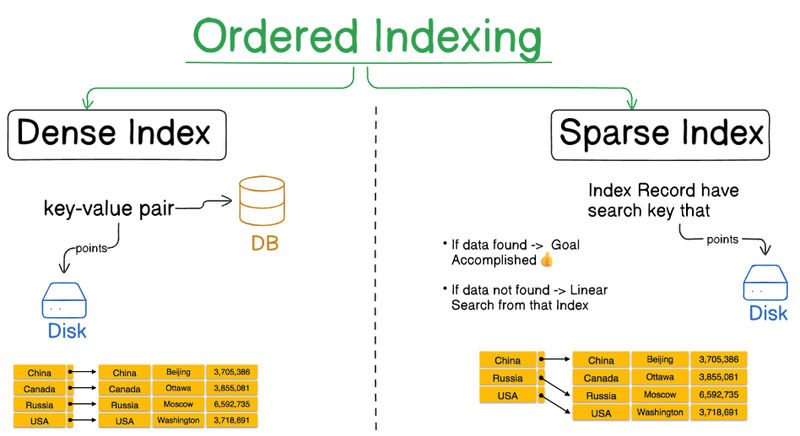
Dense Index:In dense index, there is an index record for every search key value in the database. This makes searching faster but requires more space to store index records itself. Index records contain search key value and a pointer to the actual record on the disk. -
Sparse Index:In sparse index, index records are not created for every search key. An index record here contains a search key and an actual pointer to the data on the disk. To search a record, we first proceed by index record and reach at the actual location of the data. If the data we are looking for is not where we directly reach by following the index, then the system starts sequential search until the desired data is found.
Multi-Level Indexing:
When databases grow large, even the index itself can become too big to store in memory. To solve this, multilevel indexing is used.
Concept:
- The index is divided into multiple smaller indexes.
- The lowest level points to actual data.
- The upper levels act as indexes of indexes.
- The topmost level (root index) is small enough to fit in main memory.
Benefits:
- Reduces disk access time.
- Makes searching faster and scalable for large databases.
B-Trees
In database systems, dynamic indexing is essential for efficiently locating and managing records that are frequently inserted, deleted, or updated. The B-Tree (Balanced Tree) is one of the most efficient data structures designed for this purpose. It maintains balance dynamically while allowing quick data retrieval, insertion, and deletion operations.
What is a B-Tree?
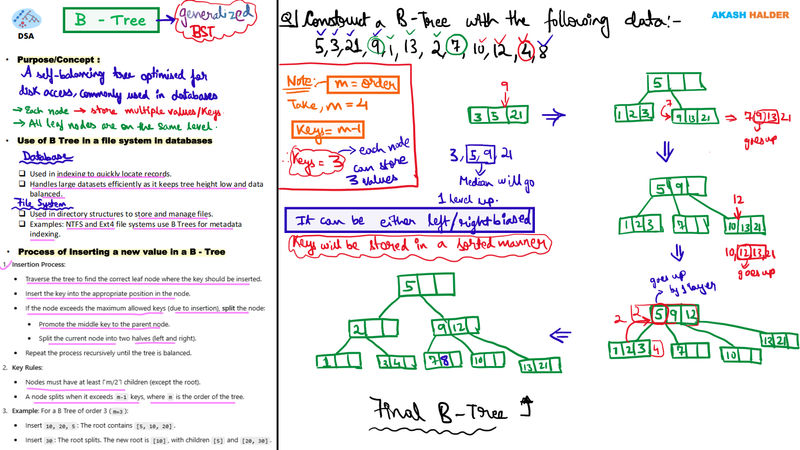
A B-Tree is a self-balancing multi-way search tree where data is stored in nodes that can have multiple keys and pointers. Unlike binary search trees, each node in a B-Tree may contain multiple keys, which helps reduce the height of the tree and thereby minimizes disk I/O operations during searches.
Key Characteristics:
- Records (or pointers to records) are stored in the nodes.
- All leaf nodes exist at the same level, ensuring balance.
- Nodes split or merge automatically during insertions and deletions to maintain uniform height.
Working of a B-Tree
1. Nodes and Keys
Each node can have multiple keys and pointers. The number of keys and pointers is determined by the order (p) of the B-Tree.
- A node can have up to p pointers and p−1 keys.
- Keys are arranged in ascending order.
2. Balanced Structure
The B-Tree is always balanced, meaning the path length from root to any leaf node is the same.
3. Search Operation
- The search starts from the root node.
- Based on key comparisons, appropriate pointers are followed down to lower levels.
- The process continues until the desired record is found or confirmed absent.
Key Properties of B-Trees
| Property | Description |
|---|---|
| Order (p) | Maximum number of child pointers per node |
| Keys per Node | Up to p−1 keys arranged in ascending order |
| Balance | All leaf nodes appear at the same level |
| Minimum Occupancy | Each node is at least half full (except the root) |
| Linked Leaves | Leaf nodes may be linked for sequential access |
Example Structure of a B-Tree
For a database with:
- Order (p): 23
- Fan-out: 16
The growth pattern is as follows:
| Level | Nodes | Keys | Pointers |
|---|---|---|---|
| Root (Level 0) | 1 | 15 | 16 |
| Level 1 | 16 | 240 | 256 |
| Level 2 | 256 | 3840 | 4096 |
| Leaf Level | 4096 | 61,440 | — |
This structure efficiently supports over 65,535 records using just three levels, resulting in very fast search operations.
B+ Trees: The Improved Version
A B+ Tree is an enhanced form of a B-Tree, optimized specifically for indexing. The primary difference is that data records are stored only in the leaf nodes, while internal nodes store only keys and pointers.
Structure:
- Internal Nodes: Contain only keys and pointers to child nodes.
- Leaf Nodes: Contain actual data records or pointers to them.
- Linked Leaves: Leaf nodes are linked to allow range queries and sequential access.

Key Properties of B+ Trees
| Property | Description |
|---|---|
| Internal Nodes | Contain only keys and child pointers |
| Leaf Nodes | Contain actual records or record pointers |
| Order (p) | Each internal node can have up to p pointers and p−1 keys |
| Linked Leaves | Enables fast range queries |
| Balanced | Automatically maintains balance during insertions/deletions |
Example Structure of a B+ Tree
Assume:
- Key size: 9 bytes
- Pointer size: 7 bytes (record), 6 bytes (block)
- Block size: 512 bytes
Derived capacity:
- Internal Node: 34 keys, 35 pointers
- Leaf Node: 31 records
| Level | Nodes | Keys | Pointers |
|---|---|---|---|
| Root | 1 | 22 | 23 |
| Level 1 | 23 | 506 | 529 |
| Level 2 | 529 | 11,638 | 12,167 |
| Leaf Level | 12,167 | 255,507 | — |
Thus, the structure can manage over 255,000 records with only three levels, offering extremely efficient access.
Advantages of Dynamic Multilevel Indexing
| Advantage | Explanation |
|---|---|
| Automatic Balancing | Nodes split or merge automatically, maintaining a balanced structure. |
| Efficient Searches | Reduced tree height leads to faster searches. |
| Quick Updates | Insertion and deletion are handled efficiently. |
| Scalability | Supports large datasets without performance degradation. |
Real-world Applications
| Domain | Use Case |
|---|---|
| DBMS | Indexing tables for fast query performance |
| File Systems | Efficient file access and directory management |
| Search Engines | Optimized keyword and document indexing |
| Operating Systems | Directory and metadata indexing |
Difference Between B-Trees and B+ Trees
| Feature | B-Tree | B+ Tree |
|---|---|---|
| Data Storage | In all nodes | Only in leaf nodes |
| Data Retrieval | Slower for range queries | Faster due to linked leaves |
| Tree Depth | Deeper | Shallower |
| Range Queries | Less efficient | Highly efficient |
| Use Cases | General-purpose indexing | Database and file system indexing |
Conclusion
B-Trees and B+ Trees play a critical role in dynamic multilevel indexing by maintaining balanced, efficient search structures.
- B-Trees store data in all nodes and provide fast direct access.
- B+ Trees, optimized for indexing, store records only at leaf nodes, ensuring faster sequential and range-based searches.
Hashing
In large database systems, searching through multilevel indexes can be time-consuming and storage-intensive. Hashing offers an efficient alternative by providing direct access to data records using a hash function. Instead of traversing index structures, hashing computes the storage address of a record directly based on its key value, leading to constant-time data retrieval.
Concept of Hashing
Hashing uses a hash function (h) that takes a search key (K) as input and returns an address or bucket number where the record is stored. This allows the database to quickly locate records without performing multi-level index lookups.
Components of Hashing
- Hash Function (h): Maps a search key to a specific bucket address.
- Bucket: The unit of storage that typically corresponds to a disk block. Each bucket can store one or more records.
Formula:
Bucket address = h(K)
Hash Organization
| Component | Description |
|---|---|
| Bucket | Logical storage unit that holds one or more data records. Usually corresponds to a physical disk block. |
| Hash Function | A deterministic mapping function h(K) that converts search keys into bucket addresses. |
Example:
If h(K) = K % 4, possible bucket addresses are 0, 1, 2, 3. Records are placed into one of these four buckets.
Static Hashing
In static hashing, the number of buckets remains fixed. The same hash function always produces the same address for a given key. While efficient for stable data sizes, static hashing struggles when the database grows or shrinks.
Operations in Static Hashing
-
Insertion Compute the bucket address using the hash function and store the record in that bucket.
address = h(K) -
Search Use the same hash function to locate the bucket and retrieve the desired record.
-
Deletion Locate the record using the hash function and remove it from the corresponding bucket.
Bucket Overflow and Collision Handling
Bucket overflow occurs when multiple records hash to the same bucket and it becomes full. This situation is known as a collision. Two primary strategies handle collisions:
1. Overflow Chaining (Closed Hashing)
- When a bucket is full, an overflow bucket is created.
- The new bucket is linked to the original one.
- The chain continues as needed.
This mechanism is suitable when data access patterns are unpredictable but not excessively dense.
2. Linear Probing (Open Hashing)
- When a collision occurs, the system searches for the next available bucket sequentially.
- The record is placed in the nearest free slot.
This method keeps all data within the main hash table, avoiding external overflow buckets.
Dynamic Hashing
Dynamic hashing (also called extendible hashing) resolves the limitations of static hashing. It allows the hash structure to expand and shrink dynamically as data grows or decreases.
Unlike static hashing, dynamic hashing uses a hash function that can produce a large number of potential values, but initially utilizes only a subset.
Organization of Dynamic Hashing
Dynamic hashing uses a directory and a hash function that produces binary hash values.
- The prefix bits of the hash value determine the bucket address.
- Each directory entry maintains a depth value, representing the number of bits used.
- When a bucket overflows, the system increases the depth and doubles the directory size, allocating new buckets accordingly.
Example
If a hash value uses 3 bits, it can address 2³ = 8 buckets. If all 8 buckets are filled, the system increases the depth to 4 bits, allowing 16 buckets.
Operations in Dynamic Hashing
| Operation | Description |
|---|---|
| Querying | Use prefix bits (as defined by the depth) to compute the bucket address and fetch the record. |
| Insertion | Compute bucket address using h(K). If the bucket is full: add new buckets, increase depth, and recompute hash values. |
| Deletion | Locate and remove the record. If a bucket becomes empty, the system may merge it with another to reduce space. |
| Update | Locate record using the hash function and update in place. |
Comparison: Static vs Dynamic Hashing
| Feature | Static Hashing | Dynamic Hashing |
|---|---|---|
| Bucket Count | Fixed | Grows/Shrinks dynamically |
| Performance | Degrades as database grows | Maintains efficiency as size changes |
| Collision Handling | Requires chaining or probing | Handled through directory expansion |
| Flexibility | Less flexible | Highly adaptive |
| Use Case | Suitable for small or stable databases | Ideal for large, dynamic databases |
Limitations of Hashing
- Not efficient for range queries (e.g., finding all records between two values) because hash functions do not preserve key ordering.
- Works best when data keys are random and uniformly distributed.
- Hash function design is crucial; poor hashing may lead to clustering and performance degradation.
- Has a higher implementation complexity compared to traditional indexing.
Advantages of Hashing
| Advantage | Description |
|---|---|
| Fast Access | Constant-time data retrieval (O(1)) for direct lookups. |
| Dynamic Adaptability | Dynamic hashing grows with the database. |
| Reduced Disk I/O | Minimizes index traversal. |
| Efficient Storage | Buckets are reused efficiently, minimizing space waste. |
Conclusion
Hashing is a powerful data organization technique that enables direct record access without traversing hierarchical indexes.
- Static hashing provides constant-time lookup but lacks scalability.
- Dynamic hashing overcomes this by expanding and contracting in response to data volume.
Although hashing is not suitable for ordered or range-based queries, it is exceptionally efficient for random access patterns, making it widely used in database indexing, symbol tables, and hash-based file systems.
2. Transaction Process
A transaction can be defined as a group of tasks. A single task is the minimum processing unit which can't be divided further.
Or, In Other words we can say:
-
Transaction is an unit of work done against the DB in a logical sequence. Here, the sequence is very important in transaction.
-
It is a logical unit of work that contains one or more SQL statements. The result of all these statements in a transaction either gets
completed successfully(all the changes made to the database are permanent) or if at any point anyfailurehappens it gets rollbacked (all the changes being done are undone.)
Lets take an example of a simple transaction. Suppose a bank employee transfers Rs 500 from A's account to B's account. This very simple and small transaction involves several low-level tasks.
A's Account
Open_Account(A)
Old = A.balance # Read A's Balance
New = Old - 500 # Process A's Balance
A.balance = New # Write Balance if Transaction Sucessfull
Close_Account(A)B's Account
Open_Account(B)
Old = B.balance # Read B's Balance
New = Old + 500 # Process B's Balance
B.balance = New # Write Balance if Transaction Sucessfull
Close_Account(B)ACID properties
A transaction is a very small unit of a program and it may contain several lowlevel tasks. A transaction in a database system must maintain Atomicity, Consistency, Isolation, and Durability − commonly known as ACID properties − in order to ensure accuracy, completeness, and data integrity.
-
Atomicity: Either all operations of transaction are reflected properly in the DB, or none are.
-
Consistency: Integrity constraints must be maintained before and after transaction. DB must be consistent after transaction happens.
-
Isolation: Even though multiple transactions may execute concurrently, the system guarantees that, for every pair of transactions Ti and Tj, it appears to Ti that either Tj finished execution before Ti started, or Tj started execution after Ti finished. Thus,
each transactionisunaware of other transactions executing concurrently in the system. Multiple transactions can happen in the system in isolation, without interfering each other. -
Durability: After transaction completes successfully, the
changesit has made to thedatabase persist, even if there are system failures.
Transaction states
-
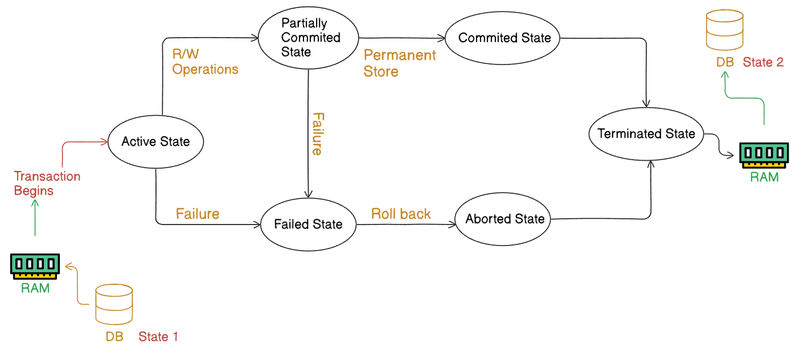
Active State: The very first state of the life cycle of the transaction, all the read and write operations are being performed. If they execute without any error the T comes to Partially committed state. Although if any error occurs then it leads to a Failed state.
-
Partially committed state: After transaction is executed the changes are saved in the buffer in the main memory. If the changes made are permanent on the DB then the state will transfer to the committed state and if there is any failure, the T will go to Failed state.
-
Committed state: When updates are made permanent on the DB. Then the T is said to be in the committed state. Rollback can’t be done from the committed states. New consistent state is achieved at this stage.
-
Failed state: When T is being executed and some failure occurs. Due to this it is impossible to continue the execution of the T
-
Aborted state: When T reaches the failed state, all the changes made in the buffer are reversed. After that the T rollback completely. T reaches abort state after rollback. DB’s state prior to the T is achieved.
-
Terminated state: A transaction is said to have terminated if has either committed or aborted.
Concurrency Control
Definition: Concurrency control in DBMS ensures that when multiple transactions execute simultaneously, the consistency and isolation of the database are maintained. It prevents conflicts like lost updates, temporary inconsistency, and uncommitted data access.
Purpose: To coordinate concurrent transactions so that the result is equivalent to executing them serially, i.e., one after another.
Common Problems in Concurrent Transactions:
| Problem | Description |
|---|---|
| Lost Update | Two transactions overwrite each other’s changes. |
| Temporary Inconsistency | One transaction reads uncommitted changes from another. |
| Unrepeatable Read | A value read twice by a transaction differs because another transaction modified it in between. |
| Deadlock | Two or more transactions wait indefinitely for each other to release locks. |
Techniques for Concurrency Control:
- Lock-based Protocols: Use locks to control access to data items.
- Timestamp-based Protocols: Assign timestamps to transactions for ordering.
- Optimistic Concurrency Control: Transactions execute freely and check for conflicts at commit time.
- Validation-based Schemes: Ensure data consistency through validation before commit.
Serializability of Scheduling
Definition: A schedule is the sequence in which transactions are executed. A schedule is said to be serializable if its outcome is the same as that of some serial execution of those transactions.
Types of Serializability:
-
Conflict Serializability: If a non-serial schedule can be transformed into a serial one by swapping non-conflicting operations, it is conflict serializable.
- Two operations conflict if they belong to different transactions, act on the same data item, and one of them is a write.
-
View Serializability: If a schedule preserves the read and write dependencies of transactions in the same way as a serial schedule, it is view serializable.
Importance: Serializability ensures isolation in ACID properties, maintaining the logical correctness of concurrent transactions.
Locking and Timestamp-based Schedulers
(a) Lock-based Schedulers
These control access to data items using locks:
- Shared Lock (S): For read operations; multiple transactions can share it.
- Exclusive Lock (X): For write operations; no other lock is allowed.
Common Locking Protocols:
-
Two-Phase Locking (2PL):
- Growing phase: Transaction acquires locks.
- Shrinking phase: Once a lock is released, no new lock can be acquired. Ensures conflict serializability but may cause deadlocks.
-
Strict 2PL: Locks are released only after commit or abort, preventing cascading rollbacks.
(b) Timestamp-based Schedulers
Each transaction is assigned a unique timestamp when it starts.
- Each data item maintains Read_TS(X) and Write_TS(X).
- A transaction’s operations are executed in timestamp order.
Rules:
- If a transaction tries to read a value written by a later transaction, it is rolled back (to maintain order).
- If a transaction tries to write after a later read/write, it is rolled back.
Advantages:
- Deadlock-free.
- Ensures serializability based on timestamps.
Database Recovery
Definition:
Database recovery is the process of restoring the database to a consistent state after a failure. Failures can be due to system crash, transaction error, or disk damage.
Types of Failures:
- Transaction Failure – Logical or input errors within a transaction.
- System Crash – Power failure or OS crash.
- Disk Failure – Physical damage to storage media.
Recovery Techniques:
1. Shadow Copy Scheme:
- A db-pointer points to the current database copy.
- Before updating, a new copy (shadow copy) is created.
- If the transaction succeeds, the db-pointer is updated to the new copy.
- If it fails, the new copy is discarded.
- Ensures Atomicity and Durability, but is inefficient for large databases.
2. Log-based Recovery:
- Every transaction operation is logged before execution in stable storage.
- Each log record contains transaction ID, data item, old value, and new value.
Types:
- Deferred Update (Deferred DB Modification): All updates are recorded in the log first and written to the database only after a transaction commits.
- Immediate Update (Immediate DB Modification): Updates occur as the transaction executes, but old values are logged to support undo if failure occurs.
Recovery Actions:
| Situation | Action |
|---|---|
| Transaction fails before commit | UNDO using old values in the log. |
| System crashes after commit | REDO using new values in the log. |
These mechanisms ensure the Atomicity and Durability components of the ACID properties.
Module 4: Authentication & Authorization
1. Authentication
Authentication is the process of verifying the identity of a user or system trying to access a database. It ensures that only legitimate users with valid credentials can connect to the DBMS.
Purpose
- To verify the user’s identity before granting access.
- To prevent unauthorized access and protect sensitive data.
- To maintain accountability, ensuring every action in the DB can be traced to a verified user.
How Authentication Works
-
User Identification: The user provides a username (or user ID).
-
Verification: The system checks the provided password, token, or biometric data against stored credentials.
-
Access Decision:
- If credentials match → Access is granted.
- If credentials fail → Access is denied and possibly logged.
Common Authentication Methods
| Method | Description |
|---|---|
| Password-based | Most common; user enters username & password stored securely (hashed/salted). |
| Token-based | Uses one-time passwords (OTPs), smart cards, or security tokens. |
| Biometric | Uses fingerprint, iris, or face recognition systems. |
| Multi-Factor (MFA) | Combines two or more methods for stronger security (e.g., password + OTP). |
| Database-level Authentication | Managed by DBMS itself (e.g., MySQL CREATE USER, GRANT). |
| External Authentication | Delegated to OS or LDAP systems (e.g., Kerberos, Active Directory). |
In DBMS Context
Database systems like MySQL, Oracle, and PostgreSQL support multiple authentication types:
-- Example in MySQL
CREATE USER 'akash'@'localhost' IDENTIFIED BY 'secure_pass123';
GRANT ALL PRIVILEGES ON portfolio_db.* TO 'akash'@'localhost';
FLUSH PRIVILEGES;This ensures only authenticated users can connect and perform operations.
2. Authorization and Access Control
Authorization is the process that determines what an authenticated user is allowed to do within the database. It defines permissions and access levels for different users or roles.
Access Control enforces these permissions by restricting database actions like reading, writing, or deleting data.
Purpose
- To protect database objects (tables, views, schemas, etc.).
- To ensure users perform only authorized operations.
- To implement least privilege principle, minimizing damage from accidental misuse or attacks.
Types of Access Control
| Type | Description |
|---|---|
| Discretionary Access Control (DAC) | Access rights are granted or revoked by the data owner using commands like GRANT or REVOKE. |
| Mandatory Access Control (MAC) | Access is controlled by a central authority based on predefined policies (e.g., government-level databases). |
| Role-Based Access Control (RBAC) | Permissions are assigned to roles, and users are assigned roles (common in enterprise DBMS). |
SQL Authorization Commands
-
GRANT: To assign privileges.
GRANT SELECT, INSERT ON student TO 'teacher'@'localhost'; -
REVOKE: To remove privileges.
REVOKE INSERT ON student FROM 'teacher'@'localhost';
Common Privileges
| Privilege | Description |
|---|---|
| SELECT | Read data from a table/view. |
| INSERT | Add new records. |
| UPDATE | Modify existing records. |
| DELETE | Remove records. |
| CREATE / DROP | Create or delete database objects. |
| EXECUTE | Run stored procedures or functions. |
Access Control Levels
- User Level: Access to database or schema.
- Object Level: Access to specific tables, views, or functions.
- Column Level: Restrict visibility to specific columns (useful for sensitive data like salary or password).
- Row Level: Access limited to certain rows based on user identity (via
WHEREclauses or policies).
Relationship Between Authentication and Authorization
| Aspect | Authentication | Authorization |
|---|---|---|
| Purpose | Verifies who the user is. | Determines what the user can do. |
| Stage | Performed before authorization. | Follows successful authentication. |
| Based on | Identity verification (passwords, tokens). | Access policies, roles, and privileges. |
| Outcome | Grants or denies login. | Grants or denies specific actions. |
DBMS Example Scenario
Suppose a banking database has two roles:
- Admin: Can view and modify all customer data.
- Teller: Can only view customer balances.
Implementation:
CREATE ROLE teller;
CREATE ROLE admin;
GRANT SELECT ON accounts TO teller;
GRANT ALL PRIVILEGES ON accounts TO admin;
CREATE USER 'rahul'@'localhost' IDENTIFIED BY 'pass123';
GRANT teller TO 'rahul'@'localhost';Here, authentication verifies Rahul’s identity, and authorization restricts his access only to viewing data.
Summary Table
| Concept | Definition | Key Mechanism | Example |
|---|---|---|---|
| Authentication | Verifies user identity | Passwords, MFA, Tokens | CREATE USER |
| Authorization | Determines access level | Roles, GRANT, REVOKE | GRANT SELECT |
| Access Control | Enforces authorization rules | DAC, MAC, RBAC | Role-based privileges |
Module 5: Data Analysis & Security
1. Introduction to Data Warehousing
A Data Warehouse (DW) is a centralized repository that stores integrated data from multiple heterogeneous sources such as databases, transactional systems, and external files. It is designed specifically for querying and analysis, not for transaction processing.
Purpose
- To support decision-making and business intelligence (BI).
- To provide a historical, subject-oriented, integrated, and time-variant view of data.
Key Characteristics
| Property | Description |
|---|---|
| Subject-oriented | Organized around major business subjects like sales, finance, or customers. |
| Integrated | Data is collected from various sources and standardized. |
| Time-variant | Maintains historical data (e.g., yearly, quarterly trends). |
| Non-volatile | Once data is stored, it is not updated or deleted frequently. |
Architecture of a Data Warehouse
-
Data Sources: Operational databases, flat files, web logs, etc.
-
ETL Process (Extract, Transform, Load):
- Extract: Retrieve data from various sources.
- Transform: Clean, filter, and format data.
- Load: Store transformed data into the warehouse.
-
Data Storage Area: The central repository storing both current and historical data.
-
OLAP Engine (Online Analytical Processing): Supports complex queries, multidimensional analysis, and data summarization.
-
Front-end Tools: Dashboards, reports, and data visualization tools for business analysis.
Schemas Used
| Schema | Structure | Description |
|---|---|---|
| Star Schema | Central fact table linked to dimension tables. | Simplest and widely used. |
| Snowflake Schema | Dimension tables are normalized into multiple related tables. | Reduces redundancy. |
| Galaxy Schema | Multiple fact tables share dimension tables. | Used for complex data marts. |
Benefits
- Enhances data analysis and reporting.
- Improves decision-making and forecasting.
- Provides data consistency across the organization.
- Supports historical and trend analysis.
2. Introduction to Data Mining
Data Mining is the process of extracting hidden patterns, trends, and knowledge from large datasets using statistical, mathematical, and machine learning techniques.
It is often considered as “Knowledge Discovery in Databases (KDD)”.
Steps in Data Mining (KDD Process)
- Data Cleaning: Remove noise and inconsistencies.
- Data Integration: Combine data from multiple sources.
- Data Selection: Retrieve relevant data for analysis.
- Data Transformation: Convert data into appropriate forms for mining.
- Data Mining: Apply algorithms to extract patterns (e.g., clustering, classification).
- Pattern Evaluation: Identify interesting and useful patterns.
- Knowledge Presentation: Visualize the results for decision-making.
Techniques of Data Mining
| Technique | Description | Example |
|---|---|---|
| Classification | Assigns data into predefined categories. | Spam vs. Non-spam email. |
| Clustering | Groups similar data items together. | Customer segmentation. |
| Association Rule Mining | Discovers relationships between items. | “If customer buys bread, they also buy butter.” |
| Regression | Predicts continuous values. | Predicting sales revenue. |
| Anomaly Detection | Identifies outliers or unusual data points. | Fraud detection. |
Applications
- Business Intelligence: Market basket analysis, sales forecasting.
- Finance: Credit scoring, risk analysis.
- Healthcare: Disease prediction, patient profiling.
- Web Mining: User behavior analysis, recommendation systems.
Difference between Data Warehousing and Data Mining
| Aspect | Data Warehousing | Data Mining |
|---|---|---|
| Purpose | Store and organize data | Analyze and discover patterns |
| Process Type | Data storage | Data analysis |
| Tools Used | OLAP, ETL | ML algorithms, statistics |
| Outcome | Historical data repository | Actionable insights and predictions |
3. SQL Injection
SQL Injection (SQLi) is a security vulnerability in which an attacker inserts or “injects” malicious SQL statements into a query to manipulate or access a database unlawfully.
It targets applications that dynamically build SQL queries using unvalidated user inputs.
Example
Vulnerable Code:
// User input: username=admin' -- and password=anything
$query = "SELECT * FROM users WHERE username = '$username' AND password = '$password'";Here, the injected input admin' -- comments out the rest of the query, allowing unauthorized login.
Resulting Query:
SELECT * FROM users WHERE username = 'admin' -- ' AND password = 'anything';The attacker logs in without knowing the real password.
Types of SQL Injection
| Type | Description |
|---|---|
| Classic SQL Injection | Inject malicious queries to manipulate database logic. |
| Blind SQL Injection | Attacker infers data from the application's responses (true/false). |
| Union-based SQL Injection | Uses the UNION keyword to extract data from other tables. |
| Error-based SQL Injection | Exploits error messages to reveal database structure. |
| Time-based Blind SQL Injection | Uses delays (like SLEEP()) to detect vulnerabilities indirectly. |
Preventive Measures
-
Input Validation: Always validate and sanitize user inputs.
-
Parameterized Queries (Prepared Statements):
$stmt = $conn->prepare("SELECT * FROM users WHERE username=? AND password=?"); $stmt->bind_param("ss", $username, $password); $stmt->execute();Prevents query manipulation.
-
Stored Procedures: Encapsulate SQL logic within the database to avoid dynamic queries.
-
Least Privilege Principle: Give minimal permissions to application-level database users.
-
Use ORM Frameworks: Frameworks like Sequelize, Hibernate, or Prisma automatically handle query sanitization.
-
Error Handling: Avoid exposing SQL error messages to users.
Consequences of SQL Injection
- Unauthorized data access or modification.
- Data theft or deletion.
- Compromise of entire database server.
- Loss of business integrity and trust.
Summary Table
| Concept | Definition | Key Focus | Tools/Methods |
|---|---|---|---|
| Data Warehousing | Centralized data storage for analytics | Data integration and OLAP | ETL, Star Schema |
| Data Mining | Discovering patterns and insights from data | Knowledge discovery | Clustering, Classification |
| SQL Injection | Attacking via malicious SQL input | Database security | Input validation, Prepared statements |
Interview Topics
1. SQL vs NoSQL Databases
Introduction to SQL Databases
SQL (Structured Query Language) databases are relational in nature. They store data in tables (rows and columns) and use predefined schemas to enforce structure and relationships.
Characteristics
- Data is structured and relational.
- Follows ACID properties (Atomicity, Consistency, Isolation, Durability).
- Requires a fixed schema.
- Data is accessed and manipulated using SQL queries.
Examples
- MySQL
- PostgreSQL
- Oracle
- Microsoft SQL Server
To Learn More about SQL Go to this MySQL Tutorial / Download as PDF.
Introduction to NoSQL Databases
NoSQL (Not Only SQL) databases are non-relational. They store data in formats such as documents, key-value pairs, graphs, or columns, and offer flexible schemas for unstructured or semi-structured data.
Characteristics
- Schema-free or dynamic schema.
- Horizontal scalability (scale-out).
- High availability and replication support.
- Best suited for Big Data and real-time applications.
- Often used in cloud, IoT, and microservice architectures.
Common Types of NoSQL Databases
| Type | Description | Example |
|---|---|---|
| Document Store | Stores data as JSON-like documents | MongoDB, CouchDB |
| Key-Value Store | Stores data as key-value pairs | Redis, DynamoDB |
| Column Store | Stores data by columns for analytics | Cassandra, HBase |
| Graph Store | Stores nodes and edges for relationships | Neo4j, Amazon Neptune |
Example Code Comparison
SQL Example (MySQL / PostgreSQL)
Table Structure:
CREATE TABLE users (
id INT PRIMARY KEY AUTO_INCREMENT,
name VARCHAR(50),
email VARCHAR(100),
age INT
);
INSERT INTO users (name, email, age)
VALUES ('Akash', 'akash@example.com', 22);
SELECT * FROM users WHERE age > 18;- Requires a predefined schema.
- Data is normalized into tables.
- JOINs are used to relate multiple tables.
NoSQL Example (MongoDB – Document-Based)
Document Structure (JSON-like):
{
"_id": 1,
"name": "Akash",
"email": "akash@example.com",
"age": 22
}MongoDB Commands:
// Insert a document
db.users.insertOne({ name: "Akash", email: "akash@example.com", age: 22 });
// Query documents
db.users.find({ age: { $gt: 18 } });- Schema is flexible; fields can vary across documents.
- No need for JOINs; nested structures store related data together.
- Ideal for agile, real-time, and distributed systems.
Historical Background
| Aspect | SQL | NoSQL |
|---|---|---|
| Origin | 1970s, developed to minimize data duplication and enforce relational consistency. | Late 2000s, emerged due to cloud computing, unstructured data, and the need for horizontal scaling. |
| Primary Focus | Data integrity and consistency. | Developer productivity, scalability, and flexibility. |
Advantages of NoSQL Databases
- Flexible Schema: No predefined schema; structure can change dynamically.
- Horizontal Scaling: Easily distribute data across multiple nodes.
- High Availability: Automatic replication ensures data redundancy.
- Fast Reads/Inserts: Optimized for read-heavy workloads.
- Cloud-Native: Suited for distributed and cloud-based systems.
- Handles Unstructured Data: Can manage JSON, logs, documents, and multimedia.
- Developer Friendly: Reduces complex migrations during development.
- No Complex Joins: Data is denormalized for performance.
- Caching Capability: Excellent for caching real-time data.
- Ideal for Big Data: Efficient for large-scale analytics and storage.
Common Misconceptions about NoSQL
| Misconception | Reality |
|---|---|
| “NoSQL databases can’t handle relationships.” | They can, using embedded documents or graph models. |
| “NoSQL databases don’t support ACID transactions.” | Modern NoSQL systems like MongoDB support ACID transactions. |
| “NoSQL replaces SQL.” | It complements SQL; hybrid systems are common in modern architectures. |
Major Disadvantages of NoSQL
- Data Redundancy: Data duplication is common due to denormalization.
- Complex Updates: Updating redundant data across multiple documents is difficult.
- Limited Querying Capability: Lacks powerful query languages like SQL.
- Weaker Consistency: Many systems prefer availability over strict consistency.
- Lack of Standardization: Query syntax differs across databases.
- No Universal ACID Support: Some NoSQL databases trade consistency for scalability.
- Difficult for Complex Transactions: Multi-document transactions can be limited.
When to Use Each
| Use Case | Recommended Database Type |
|---|---|
| Highly structured data with relationships | SQL |
| Rapid development, schema flexibility | NoSQL |
| Real-time analytics and high scalability | NoSQL |
| Strict data integrity (banking, accounting) | SQL |
| Microservices and cloud-native apps | NoSQL |
| Complex reporting and JOIN operations | SQL |
SQL vs NoSQL
| Feature | SQL Databases | NoSQL Databases |
|---|---|---|
| Data Model | Relational (tables, rows, columns) | Non-relational (documents, key-value, graph, column) |
| Schema | Fixed, predefined | Dynamic or schema-less |
| Scalability | Vertical (scale-up by upgrading hardware) | Horizontal (scale-out across servers) |
| Transactions | Fully ACID compliant | BASE (Basically Available, Soft state, Eventually consistent) |
| Joins | Supports JOIN operations | Typically avoided; data is nested |
| Query Language | Structured Query Language (SQL) | Database-specific APIs or JSON queries |
| Performance | Slower for large-scale, distributed workloads | Optimized for high-volume and low-latency workloads |
| Storage Type | Row-based storage | Key-value, document, column, or graph formats |
| Examples | MySQL, PostgreSQL, Oracle | MongoDB, Redis, Cassandra, Neo4j |
| Use Case | Banking, ERP, structured data | Social media, IoT, real-time analytics |
Conclusion
- SQL databases emphasize structure, integrity, and consistency, making them ideal for applications like banking or inventory management.
- NoSQL databases emphasize flexibility, scalability, and speed, making them suitable for modern web apps, IoT, real-time systems, and Big Data analytics.
In practice, most modern systems use both, where SQL handles transactional data and NoSQL handles large, unstructured, or rapidly changing datasets.
2. Partitioning and Sharding in DBMS
Modern databases store massive volumes of data that grow rapidly with time. Managing such large databases can become inefficient, affecting query performance, scalability, and availability. To overcome these challenges, database engineers use partitioning and sharding, both of which divide large datasets into smaller, more manageable units.
The principle is simple:
“A big problem can be solved efficiently when broken into smaller parts.”
What is Partitioning?
Partitioning is a database optimization technique used to divide a large database table into smaller, manageable segments known as partitions. Each partition contains a subset of the table’s data and can be stored on separate disks or servers.
Despite partitioning, the table remains logically one single entity — SQL queries can access it as usual.
Key Idea
Instead of processing a giant table, queries now operate on smaller, partitioned tables, improving:
- Performance
- Manageability
- Scalability
Purpose of Partitioning
| Purpose | Description |
|---|---|
| Performance Optimization | Queries scan fewer rows within a partition rather than the entire table. |
| Improved Manageability | Easier to maintain and backup smaller data slices. |
| Parallelism | Multiple partitions can be queried in parallel. |
| High Availability | Even if one partition/server fails, others continue to function. |
| Cost Efficiency | Reduces the need for expensive hardware upgrades (scale-out instead of scale-up). |
Types of Partitioning
Partitioning can be implemented in two main ways:
A. Vertical Partitioning
- Data is divided column-wise.
- Each partition stores different columns of a table.
Example:
| ID | Name | Salary | |
|---|---|---|---|
| 1 | Akash | akash@example.com | 60000 |
Vertical partitioning could split this into:
- Partition 1:
(ID, Name, Email) - Partition 2:
(ID, Salary)
Pros:
- Useful when applications frequently access only specific columns.
- Reduces I/O load for partial data access.
Cons:
- To reconstruct a full record, data from multiple partitions must be joined (higher latency).
B. Horizontal Partitioning
- Data is divided row-wise (tuple-wise).
- Each partition contains different rows of the same table.
Example:
| ID | Name | Age | City |
|---|---|---|---|
| 1 | Akash | 22 | Delhi |
| 2 | Priya | 24 | Mumbai |
| 3 | Raj | 25 | Chennai |
Horizontal partitioning:
- Partition 1 → Rows 1–1000
- Partition 2 → Rows 1001–2000
- Partition 3 → Rows 2001–3000
Pros:
- Queries can be routed only to relevant partitions.
- Ideal for distributed systems and scalability.
Cons:
- Slight complexity in determining partition logic.
When Partitioning is Applied
Partitioning becomes essential when:
- Dataset size grows enormously, making query performance slow.
- Server load increases, causing high response times.
- Backup, restore, or maintenance operations become cumbersome.
- Distributed or Cloud databases are used (requiring data segmentation).
Advantages of Partitioning
| Advantage | Description |
|---|---|
| Parallelism | Queries can run on multiple partitions simultaneously. |
| High Availability | Failure of one partition/server does not affect the entire system. |
| Performance | Queries and indexes operate on smaller data subsets. |
| Manageability | Easier to back up, migrate, or maintain data. |
| Scalability | Supports distributed data storage without affecting structure. |
| Cost Reduction | Enables horizontal scaling, avoiding costly hardware upgrades. |
Distributed Database
A distributed database is a single logical database stored across multiple physical locations (servers). Each site manages its data locally but is connected by a network and appears as a single unified system to the user.
Partitioning, Clustering, and Sharding are optimization techniques used to implement distributed databases.
Sharding
Sharding is a specific implementation of horizontal partitioning across multiple servers or database instances. It involves splitting a large dataset into smaller subsets called shards, each hosted on a separate database instance.
A routing layer determines which shard contains the requested data.
Example of Sharding
Scenario:
A global e-commerce platform stores user data by region.
| Shard | Region | Database Server |
|---|---|---|
| Shard 1 | Asia | DB_Server_1 |
| Shard 2 | Europe | DB_Server_2 |
| Shard 3 | America | DB_Server_3 |
When a user from India logs in, the routing layer directs the query to Shard 1 (Asia), instead of searching all data globally.
How Sharding Works
- Sharding Key: A field (like user ID or region) determines which shard stores the data.
- Routing Layer: Routes queries to the appropriate shard using the key.
- Independent Shards: Each shard behaves as a separate database instance.
Advantages of Sharding
| Benefit | Description |
|---|---|
| Scalability | Allows horizontal scaling across multiple machines. |
| Availability | Failure in one shard does not affect others. |
| Performance | Queries operate on smaller datasets. |
| Load Distribution | Distributes data and workload evenly. |
Disadvantages of Sharding
| Limitation | Description |
|---|---|
| Complexity | Requires routing layer and consistent partition mapping. |
| Re-Sharding Issues | If data grows unevenly, rebalancing shards is challenging. |
| Non-uniform Data Distribution | May cause load imbalance. |
| Scatter-Gather Problem | Analytical queries need to fetch data from multiple shards, increasing latency. |
9. Difference Between Partitioning and Sharding
| Aspect | Partitioning | Sharding |
|---|---|---|
| Definition | Logical division of a large table into smaller pieces within a single database. | Physical division of data across multiple database instances. |
| Implementation Scope | Within one DB server. | Across multiple servers or databases. |
| Data Distribution | Logical (can exist on same hardware). | Physical (distributed across nodes). |
| Used For | Performance and management optimization. | Scalability and distributed storage. |
| Routing Layer | Not required. | Required to direct queries to shards. |
| Failure Impact | Failure affects the same DB instance. | Isolated; failure of one shard doesn’t affect others. |
| Complexity | Easier to manage. | More complex (requires mapping, balancing). |
| Best Suited For | Large single-server databases. | Distributed, cloud-scale applications. |
Practical Examples
Partitioning Example (Horizontal)
-- Table Partition Example in MySQL
CREATE TABLE orders (
order_id INT,
order_date DATE,
customer_id INT
)
PARTITION BY RANGE (YEAR(order_date)) (
PARTITION p2022 VALUES LESS THAN (2023),
PARTITION p2023 VALUES LESS THAN (2024)
);Divides data by year into multiple partitions within the same database.
Sharding Example (Conceptual)
// Pseudocode for sharding using userID
if (userID % 3 === 0)
connect(DB_Server_1);
else if (userID % 3 === 1)
connect(DB_Server_2);
else
connect(DB_Server_3);Distributes user data across multiple databases (shards) based on user ID.
Summary Table
| Concept | Definition | Example | Purpose |
|---|---|---|---|
| Partitioning | Divides a table into smaller segments within the same database. | Year-wise orders partition | Performance and manageability |
| Sharding | Distributes database segments across multiple servers. | Region-wise user data | Scalability and load balancing |
| Vertical Partitioning | Split columns of a table. | User info vs Salary data | Optimize column access |
| Horizontal Partitioning | Split rows of a table. | Orders by region | Optimize data access by key |
Conclusion
- Partitioning enhances query performance and manageability within a single database.
- Sharding ensures scalability and high availability across distributed systems.
- Both are fundamental database optimization techniques in modern large-scale systems like Google, Amazon, and Netflix, where billions of records must be managed efficiently.
3. CAP Theorem and Master–Slave Database Architecture
CAP Theorem
The CAP Theorem (also known as Brewer’s Theorem) is one of the most important principles in Distributed Database Systems. It defines the trade-offs a distributed database must make between Consistency, Availability, and Partition Tolerance — the three essential properties of distributed systems. Understanding this theorem helps engineers design efficient, fault-tolerant, and scalable distributed databases based on the specific requirements of an application.
Breaking Down CAP
Consistency (C)
In a consistent distributed system, all nodes reflect the same data at any given time. When a write operation occurs, the update must be propagated to all replicas so that any subsequent read operation returns the most recent value.
Example: If a user updates their email ID in one node, any subsequent read from another node should immediately return the new email ID.
Key Point: All clients see the same data simultaneously, ensuring synchronized state across the cluster.
Availability (A)
A system is available if it remains operational and responsive even when some nodes fail. Every request — read or write — receives a response, though it may not always reflect the most recent data.
Example: Even if one server is down, other nodes continue serving requests without downtime.
Key Point: The system guarantees responsiveness but not necessarily the latest consistency.
Partition Tolerance (P)
Partition tolerance refers to the system’s ability to continue functioning despite communication failures or network partitions between nodes. If a network partition occurs (e.g., some nodes can’t communicate), a partition-tolerant system remains operational by replicating and distributing data.
Example: If Node A cannot communicate with Node B due to network issues, both can still serve requests independently until communication is restored.
Key Point: A partition-tolerant system sacrifices either consistency or availability but not both.
The CAP Theorem Statement
The CAP Theorem states that:
In a distributed system, it is impossible to guarantee Consistency, Availability, and Partition Tolerance simultaneously. A system can only provide two of these three properties at any given time.
Therefore, distributed databases must choose between consistency and availability when a partition occurs.

CAP in NoSQL Databases
NoSQL databases are designed to operate across distributed networks and are optimized for scalability and high availability. Depending on business needs, each NoSQL database prioritizes different combinations of CAP properties.
CA Databases (Consistency + Availability)
- These databases maintain data consistency across all nodes and ensure high availability as long as no network partition occurs.
- They are not fault-tolerant because partitions (network failures) can cause system unavailability.
Example: Relational databases like MySQL or PostgreSQL configured with replication can function as CA systems in non-partitioned environments.
Use Case: Enterprise systems requiring consistent transactions but deployed in stable network environments.
CP Databases (Consistency + Partition Tolerance)
- These systems maintain data consistency and tolerance to network partitions, but sacrifice availability during a partition.
- If a partition occurs, inconsistent nodes are taken offline until synchronization is restored.
Example: MongoDB is a CP database. It uses a replica set with one primary node and multiple secondary nodes. Only the primary handles write requests; if it fails, a secondary becomes the new primary. During partitioning, unavailable nodes may reject requests to preserve consistency.
Use Case: Banking and financial applications where data accuracy is critical, and temporary unavailability is acceptable.
AP Databases (Availability + Partition Tolerance)
- These databases guarantee availability and partition tolerance, but may return stale data during partitions.
- All nodes remain operational and eventually synchronize after partitions are resolved (eventual consistency).
Example: Apache Cassandra and Amazon DynamoDB are AP databases. They have no primary node, and all nodes can handle read/write operations. Data updates propagate asynchronously across the cluster.
Use Case: Social media platforms, messaging systems, and e-commerce websites where availability and speed matter more than strict consistency.
Summary Table – CAP in Databases
| Database Type | Properties Ensured | Compromised Property | Example | Typical Use Case |
|---|---|---|---|---|
| CA | Consistency + Availability | Partition Tolerance | MySQL, PostgreSQL | Enterprise data centers with stable networks |
| CP | Consistency + Partition Tolerance | Availability | MongoDB | Banking, financial systems |
| AP | Availability + Partition Tolerance | Consistency | Cassandra, DynamoDB | Social media, real-time applications |
Design Implications of CAP
When designing distributed systems:
- Choose CP for accuracy-sensitive systems (e.g., banking).
- Choose AP for availability-first systems (e.g., social media, streaming).
- CA systems work well only when network partitions are rare or negligible.
No single database satisfies all three properties simultaneously; instead, engineers must balance them based on application goals.
Master–Slave Database Architecture
Overview
Master–Slave Architecture is a database scaling pattern used to optimize I/O performance in systems with high read and write workloads. It follows the Command Query Responsibility Segregation (CQRS) principle — separating write and read operations to improve efficiency.
In this setup:
- The Master Database handles write (insert, update, delete) operations.
- The Slave Databases handle read (select) operations.
How It Works
-
Master Node:
- The primary source of truth.
- All updates (writes) are applied here.
- Data from the master is replicated to slave databases.
-
Slave Nodes:
- Read-only replicas of the master database.
- Serve user read requests to reduce load on the master.
- Updated through database replication mechanisms.
-
Replication:
- Can be synchronous (instant consistency) or asynchronous (eventual consistency).
- Ensures all slave nodes reflect master data periodically.

Example Workflow
- A user submits an update query → Directed to Master DB.
- Another user fetches data → Served from a Slave DB.
- Slaves synchronize with the master automatically to stay updated.
Advantages
| Benefit | Description |
|---|---|
| Load Balancing | Distributes read and write loads efficiently. |
| Improved Performance | Reduces read latency for high-traffic systems. |
| High Availability | System remains operational even if a slave fails. |
| Reliability | Master’s data is backed up across replicas. |
| Scalability | Additional slave nodes can be added easily. |
Example Implementation (MySQL)
-- On Master DB
CREATE USER 'replica'@'%' IDENTIFIED BY 'replica_pass';
GRANT REPLICATION SLAVE ON *.* TO 'replica'@'%';
-- On Slave DB
CHANGE MASTER TO
MASTER_HOST='master_host',
MASTER_USER='replica',
MASTER_PASSWORD='replica_pass',
MASTER_LOG_FILE='mysql-bin.000001',
MASTER_LOG_POS= 107;
START SLAVE;This setup ensures all data written to the Master is replicated to Slave(s) in real-time or near real-time.
Use Cases
- E-commerce platforms: High concurrent read/write activity.
- Analytics systems: Heavy read workloads on replicated slaves.
- Content delivery applications: Fast global read performance.
Key Points
- Master → Handles all writes (true source of data).
- Slave → Handles reads (replicated copies).
- Replication ensures data consistency across nodes.
- Ideal for systems emphasizing reliability, availability, and scalability under heavy traffic.
Conclusion
Both the CAP Theorem and Master–Slave Architecture form the foundation of modern distributed databases:
- CAP Theorem defines the trade-offs among consistency, availability, and partition tolerance.
- Master–Slave Architecture practically implements scaling and reliability by distributing read and write operations.
Together, they help design robust, efficient, and high-performance distributed systems suited to real-world scalability demands.
4. Scaling Patterns in DBMS
Scaling a database means increasing its capacity to handle higher loads — more users, more requests, and more data — without degrading performance. In this case study, we’ll explore how a Cab Booking App evolves from a tiny startup system to a globally scalable platform, applying a series of database scaling patterns to solve real-world performance challenges.
The Beginning: The Startup Phase
At the initial stage:
- The app serves ~10 customers.
- A single small database server stores all information — customers, trips, locations, bookings, and trip history.
- Average load: ~1 booking every 5 minutes.
This architecture is simple and efficient for early growth but not scalable as traffic increases.
The Problem Begins
As the app gains popularity:
-
Bookings rise to 30 per minute and beyond.
-
The single database server begins to struggle with:
- High API latency
- Transaction deadlocks and starvation
- Frequent timeouts
- Slow user experience
To fix this, the company must apply database optimization and scaling techniques.
Pattern 1: Query Optimization & Connection Pooling
Concept
Before scaling infrastructure, optimize what already exists.
Techniques
-
Query Optimization:
- Rewrite inefficient SQL queries.
- Use proper indexes, query plans, and denormalization for frequent lookups.
-
Caching:
- Cache frequently accessed data (like user profiles, trip history, and payment data) using Redis or Memcached.
-
Connection Pooling:
- Use libraries like HikariCP or pgBouncer to reuse database connections.
- Allows multiple application threads to share connections efficiently.
-
Database Redundancy:
- Add replicas or use NoSQL for less-structured data.
Outcome
- Query latency drops significantly.
- The app handles up to 100 bookings per minute smoothly.
Pattern 2: Vertical Scaling (Scale-Up)
Concept
Upgrade the existing server hardware instead of changing architecture.
Implementation
- Increase RAM, CPU cores, and SSD storage.
- Optimize database configuration (buffer size, cache limits, I/O throughput).
Advantages
- Simple and quick to implement.
- Cost-effective up to a point.
Limitations
- Beyond a certain capacity, costs grow exponentially.
- Hardware upgrades cannot overcome single-node limitations.
Outcome
- Performance improves temporarily, handling 300 bookings per minute.
Pattern 3: Command Query Responsibility Segregation (CQRS)
Concept
Separate read and write operations to reduce contention on a single database.
Implementation
-
Introduce Master–Slave Replication:
- Primary (Master) handles write operations.
- Replicas (Slaves) handle read operations.
-
Use read replicas to balance query loads across multiple machines.
Advantages
- Improved read performance.
- Better load distribution across replicas.
Challenges
- Replication lag between master and replicas.
- Heavy write traffic can still overload the primary database.
Outcome
- Efficient up to 500–600 bookings per minute, but write scalability remains limited.
Pattern 4: Multi-Primary Replication
Concept
Allow all nodes to act as both read and write replicas.
Implementation
- Each node can process both read and write queries.
- Nodes form a logical circular ring to replicate changes to one another.
Advantages
- High write scalability — all servers accept writes.
- Fault-tolerant, since each node can serve independently.
Challenges
- Increased system complexity.
- Requires synchronization and conflict resolution.
- Risk of data inconsistency under heavy writes.
Outcome
- Performance increases, but at ~50 requests/sec, latency and replication delays appear again.
Pattern 5: Partitioning by Functionality
Concept
Split data by functional domains into different databases or schemas.
Implementation
-
Separate large tables by business functions:
CustomerDB→ customer details.BookingDB→ bookings and payments.LocationDB→ routes and geo-data.
-
Each DB can use its own replication or scaling pattern (single-primary or multi-primary).
Advantages
- Improved modularity and fault isolation.
- Easier to manage specific functionalities independently.
Challenges
- The application layer must handle cross-database joins.
- Increases complexity in backend logic.
Outcome
- The system supports multi-country operations efficiently.
Pattern 6: Horizontal Scaling (Scale-Out)
Concept
Distribute data horizontally across multiple servers — known as Sharding.
Implementation
- Divide data across multiple shards based on a shard key (e.g., customer ID or region).
- Each shard has the same schema but holds a subset of total data.
- Optionally, each shard has replicas for fault tolerance.
Advantages
- Virtually unlimited scalability.
- Reduced query latency (localized data access).
- Fault isolation — failure in one shard doesn’t affect others.
Challenges
- Complex to implement and maintain (requires routing layer).
- Re-sharding (redistributing data) is difficult.
- Cross-shard queries are slower (Scatter-Gather problem).
Outcome
- Enables global scalability across multiple continents.
Pattern 7: Data Centre-wise Partitioning
Concept
Deploy region-specific data centers to minimize network latency and improve reliability.
Implementation
- Set up multiple data centers across continents (e.g., Asia, Europe, America).
- Implement cross–data center replication for synchronization and disaster recovery.
- Route user requests to the nearest data center using Geo-DNS or load balancers.
Advantages
- Reduced latency for geographically distributed users.
- Improved availability and disaster recovery.
- Enables data locality and compliance with regional regulations.
Outcome
- System becomes globally resilient, capable of serving millions of requests per minute.
Summary Table of Scaling Patterns
| Pattern | Technique | Goal | Key Benefit | Challenge |
|---|---|---|---|---|
| 1 | Query Optimization & Connection Pooling | Performance tuning | Low-cost improvement | Limited scalability |
| 2 | Vertical Scaling (Scale-Up) | Hardware upgrade | Quick performance boost | Expensive long-term |
| 3 | CQRS (Master–Slave) | Separate reads/writes | Load balancing | Replication lag |
| 4 | Multi-Primary Replication | Distributed writes | High write throughput | Data conflicts |
| 5 | Functional Partitioning | Data by domain | Manageability | Complex joins |
| 6 | Horizontal Scaling (Sharding) | Split data by key | Massive scalability | Complex management |
| 7 | Data Centre Partitioning | Geo-distribution | Low latency, disaster recovery | High operational cost |
Conclusion
In the Cab Booking App’s journey:
- The system evolved from a single small database to a globally distributed architecture.
- Each scaling pattern introduced a new layer of performance, availability, and fault tolerance.
- The trade-off was increasing system complexity.
Ultimately:
“Database scaling is not a single step — it’s an evolutionary process that balances performance, cost, and complexity as the business grows.”
These seven scaling patterns represent the progressive path of DB optimization, used by real-world companies like Uber, Ola, and Lyft to manage massive, global-scale systems efficiently.
