


🔍 Linear Search vs Binary Search
Searching algorithms are fundamental to computer science, and among the simplest yet most effective ones are Linear Search and Binary Search. This article covers their concepts, time complexities, implementations, and differences across languages.
What is Linear Search?
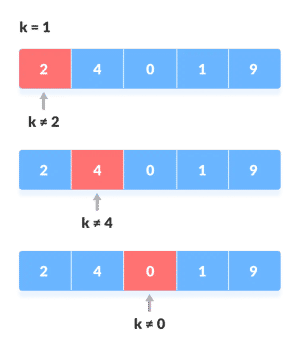
Linear Search traverses the list sequentially, comparing each element with the target until it is found or the list ends.
Linear Search Flow (Mermaid Diagram)
flowchart TD
A[Start] --> B[Traverse Array]
B --> C{arr[i] == target?}
C -- Yes --> D[Return Index]
C -- No --> E[Increment i]
E --> B
B --> F[Not Found]
🔹 Time Complexity
- Best Case:
O(1) - Average Case:
O(n) - Worst Case:
O(n)
🔹 Space Complexity
O(1)— No extra space required.
🚀 Implementations of Linear Search
#include <stdio.h>
int linearSearch(int arr[], int n, int target) {
for (int i = 0; i < n; i++) {
if (arr[i] == target)
return i;
}
return -1;
}
int main() {
int arr[] = {10, 23, 45, 70, 11, 15};
int n = sizeof(arr) / sizeof(arr[0]);
int target = 70;
int result = linearSearch(arr, n, target);
printf("Element found at index: %d\n", result);
return 0;
}#include <iostream>
using namespace std;
int linearSearch(int arr[], int n, int target) {
for (int i = 0; i < n; i++) {
if (arr[i] == target)
return i;
}
return -1;
}
int main() {
int arr[] = {10, 23, 45, 70, 11, 15};
int n = sizeof(arr) / sizeof(arr[0]);
int target = 70;
int result = linearSearch(arr, n, target);
cout << "Element found at index: " << result << endl;
return 0;
}public class Main {
public static int linearSearch(int[] arr, int target) {
for (int i = 0; i < arr.length; i++) {
if (arr[i] == target)
return i;
}
return -1;
}
public static void main(String[] args) {
int[] arr = {10, 23, 45, 70, 11, 15};
int target = 70;
int result = linearSearch(arr, target);
System.out.println("Element found at index: " + result);
}
}def linear_search(arr, target):
for i in range(len(arr)):
if arr[i] == target:
return i
return -1
arr = [10, 23, 45, 70, 11, 15]
target = 70
result = linear_search(arr, target)
print(f"Element found at index: {result}")function linearSearch(arr, target) {
for (let i = 0; i < arr.length; i++) {
if (arr[i] === target) {
return i;
}
}
return -1;
}
const arr = [10, 23, 45, 70, 11, 15];
const target = 70;
console.log("Element found at index:", linearSearch(arr, target));🧐 What is Binary Search?
Binary Search works on sorted arrays. It repeatedly divides the search interval into halves, reducing the time significantly.
Binary Search Flow (Mermaid Diagram)
flowchart TD
A[Start] --> B[Initialize low, high]
B --> C{low <= high?}
C -- No --> H[Not Found]
C -- Yes --> D[Compute mid]
D --> E{arr[mid] == target?}
E -- Yes --> F[Return mid]
E -- No --> G{arr[mid] < target?}
G -- Yes --> I[low = mid + 1]
G -- No --> J[high = mid - 1]
I --> B
J --> B
🔹 Time Complexity
- Best Case:
O(1) - Average Case:
O(log n) - Worst Case:
O(log n)
🔹 Space Complexity
O(1)— iterativeO(log n)— recursive
🚀 Implementations of Binary Search
#include <stdio.h>
int binarySearch(int arr[], int low, int high, int target) {
while (low <= high) {
int mid = low + (high - low) / 2;
if (arr[mid] == target) return mid;
if (arr[mid] < target) low = mid + 1;
else high = mid - 1;
}
return -1;
}
int main() {
int arr[] = {10, 23, 45, 70, 100, 150};
int n = sizeof(arr) / sizeof(arr[0]);
int target = 70;
int result = binarySearch(arr, 0, n - 1, target);
printf("Element found at index: %d\n", result);
return 0;
}#include <iostream>
using namespace std;
int binarySearch(int arr[], int low, int high, int target) {
while (low <= high) {
int mid = low + (high - low) / 2;
if (arr[mid] == target) return mid;
if (arr[mid] < target) low = mid + 1;
else high = mid - 1;
}
return -1;
}
int main() {
int arr[] = {10, 23, 45, 70, 100, 150};
int n = sizeof(arr) / sizeof(arr[0]);
int target = 70;
int result = binarySearch(arr, 0, n - 1, target);
cout << "Element found at index: " << result << endl;
return 0;
}public class Main {
public static int binarySearch(int[] arr, int target) {
int low = 0, high = arr.length - 1;
while (low <= high) {
int mid = low + (high - low) / 2;
if (arr[mid] == target) return mid;
if (arr[mid] < target) low = mid + 1;
else high = mid - 1;
}
return -1;
}
public static void main(String[] args) {
int[] arr = {10, 23, 45, 70, 100, 150};
int target = 70;
int result = binarySearch(arr, target);
System.out.println("Element found at index: " + result);
}
}def binary_search(arr, target):
low, high = 0, len(arr) - 1
while low <= high:
mid = (low + high) // 2
if arr[mid] == target:
return mid
elif arr[mid] < target:
low = mid + 1
else:
high = mid - 1
return -1
arr = [10, 23, 45, 70, 100, 150]
target = 70
result = binary_search(arr, target)
print(f"Element found at index: {result}")function binarySearch(arr, target) {
let low = 0, high = arr.length - 1;
while (low <= high) {
let mid = Math.floor((low + high) / 2);
if (arr[mid] === target) return mid;
if (arr[mid] < target) low = mid + 1;
else high = mid - 1;
}
return -1;
}
const arr = [10, 23, 45, 70, 100, 150];
const target = 70;
console.log("Element found at index:", binarySearch(arr, target));📌 Conclusion
- Linear Search: Works on any list but slower —
O(n) - Binary Search: Much faster —
O(log n)— but requires sorted input
